
The Quiet Revolution on an Insurance Agent's Desk
Agent-first tool: upload insurance policy PDFs, walk a client through a short questionnaire, get AI-ranked matches with a real-numbers calculator and a printable client summary.
The Quiet Revolution on an Insurance Agent's Desk
Jane has been an insurance agent at Great Eastern for thirty-two years. She remembers when "doing the comparison" meant a thick paper binder and a calculator. So when her younger colleagues started talking about "AI" last year, she did what she always does with new shiny things - she nodded politely, made a cup of teh tarik, and waited to see if it would still be around in six months.
It is. And after a quiet Tuesday morning last week, she has changed her mind about it.
A traditional Tuesday morning
Her ten o'clock is James, thirty-eight, married, two young kids, a mild asthma diagnosis from his army days. He sits down with the look every agent recognises: he wants to do the right thing for his family, but he doesn't know where to start, and he is a little embarrassed about that.
Jane pulls out her binder.
The first half-hour is conversation. What keeps him up at night, what his wife has been worrying about, whether his employer's group plan actually covers what he thinks it covers. The next two hours are the part that makes Jane tired. She thumbs through forty-odd plans across the Great Eastern range. Some she rules out immediately because of the asthma footnote on page seven. Some she rules out because the premium would eat half his monthly budget. For the four or five that survive, she copies the relevant numbers onto her yellow notepad, runs the maths for his age band, and circles the two she thinks are the strongest fit. Then there is the term-life policy James already has with a competitor, she has to take his word for what it covers, because she has no easy way to look it up.
She types up a comparison sheet in Word. Sends it the next morning. Total time invested, from greeting to sent email: nearly three hours, most of it not spent talking to James.
This is how it has worked for thirty-two years.
What's hard about the traditional way
It is hard to keep up as products refresh every quarter
- It is easy to miss an exclusion buried on page seven
- There is no quick way to verify a policy from another insurer
- Every comparison sheet ends up looking a little generic, no matter how hard you try
- The mechanical comparison crowds out the part that actually matters: the conversation
The same Tuesday, with an AI assistant
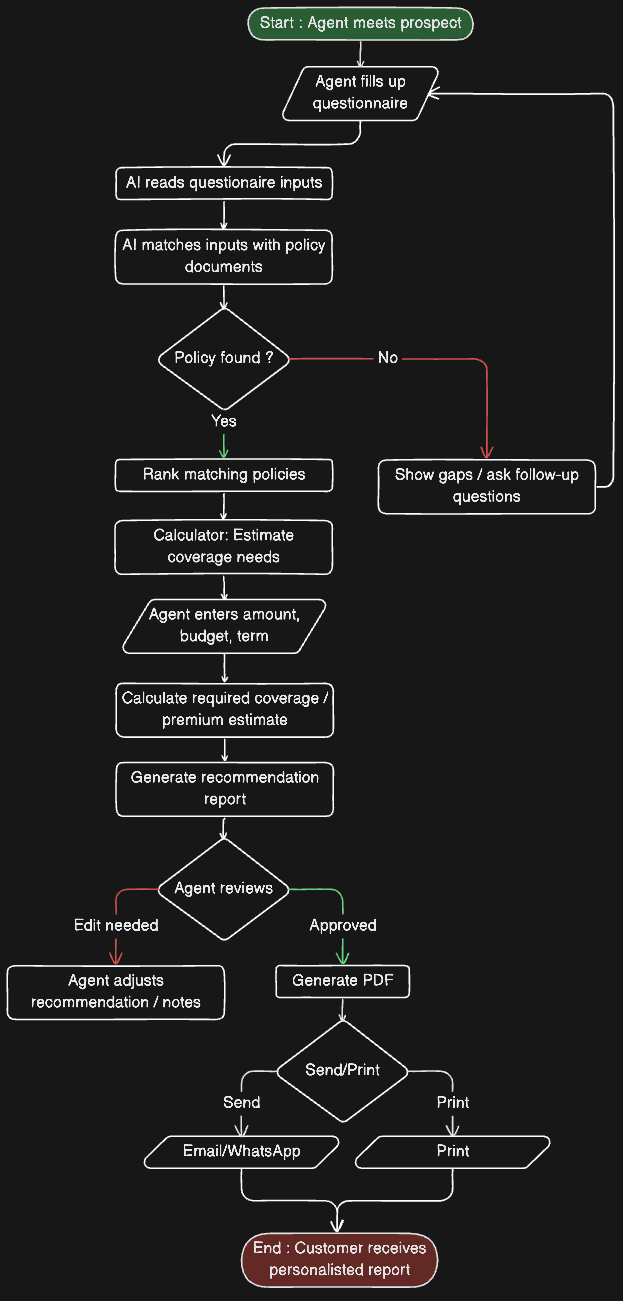
Now picture the same morning, but Jane has a tablet on the table between her and James, and on it is an AI-assisted matching tool.
Together, they walk through five short sections — his profile, what he most cares about, his monthly budget, his life situation, and a free space for "anything else worth knowing." It takes about four minutes. For "what you most care about" James picks three: family protection, critical illness, and retirement savings. (The tool lets him pick up to three, which forces a small, useful conversation about priorities.)
Then comes the part that used to take Jane forty-five minutes on her own: existing coverage. The tool shows a searchable list of every plan in the Great Eastern catalogue. She ticks the two James already has, done in seconds. For the term-life plan he holds with another insurer, she types in the company name and product name. The tool quietly looks it up online and pulls back a one-line summary of what it covers, so the matcher can avoid recommending something James effectively already owns.
She presses See matches.
Within seconds, James is looking at a ranked shortlist of four plans. Each one shows a fit score (a number out of 100, like 87 or 92), a two-sentence explanation of why this one fits him, the estimated monthly premium for someone his age, the three benefits most relevant to his concerns, and any caveats Jane should flag, things like "long waiting period for cancer-related claims" or "this duplicates the term life he already has." One of them is marked the "best match."
He taps it. A side panel slides open with an interactive calculator. James drags a slider to see what his payout looks like at $500,000 of coverage versus $750,000. He gets it instantly, in a way no Word document has ever managed.
When they are ready, Jane presses Generate summary. A clean, plain-English document appears, already addressed to James, no jargon, ready to email.
Total time: about fifteen minutes. Most of it spent in conversation, not in the binder.
Userflow
Side by Side
| Area | Traditional | With AI Assistance |
|---|---|---|
| Time per client | 2–3 hours | ~15 minutes |
| Comparing plans | By hand from a catalogue | Ranked instantly with fit scores |
| Existing coverage check | Take the client at their word | Looked up automatically |
| Why a plan was picked | The agent’s notes, mostly remembered | Plain-English explanation for each plan |
| Catching deal-breakers | Manual scan of fine print | Surfaced as caveats |
| Client takeaway | Generic comparison sheet | Personalised summary, ready to send |
| What the agent does | Mechanical comparison | Conversation, judgment, and relationship |
What does not change
This is the part Jane wants her younger colleagues to understand.
The tool does not replace her. It removes the mechanical work so she can do more of the part that makes her good at her job. Reading the room, sensing what James is actually worried about, not just what he ticked. Translating the recommendations through the weight of three decades of experience. Being the person James calls in five years when his daughter is in hospital and the claim form looks intimidating. Being a named human being he asks for, rather than a faceless platform.
The AI gives her a sharper shortlist. She gives the client trust. Those are different jobs, and the second one is not getting automated any time soon.
Behind the scenes, in plain English
If you are curious how the tool actually works, the short version is three steps:
- The system first applies hard rules - things like age limits and exclusions for pre-existing conditions to remove plans the client cannot qualify for at all.
- The remaining plans are scored by an AI based on what the client said matters most, their budget, their life situation, and what they already own.
- The AI is asked to explain itself in two sentences for every plan, so the agent can sanity-check it before showing the client.
That is the entire trick. There is no magic. Just a faster shortlist, a clearer explanation, and an honest list of caveats.
Try it yourself
The workflow described above is built into a tool we are calling Coverly. It is currently set up around the Great Eastern catalogue, with the same forty-eight policies an agent like Jane would already know by heart.
If you would like to try it on a real client profile, yours, or a hypothetical one, the live demo is here: **[demo link]**. No sign-up needed for the demo run.
Jane still keeps her binder on the shelf, by the way. Old habits. But she has not opened it for a client in three weeks.
Facing a similar challenge? Let's talk.
30-minute call. We'll map two automation opportunities you can ship in 60 days. No deck, no pitch.